Private apps
Install an app for just yourself or your organization, without publishing it to the public catalog or going through review.
Treat every image as fully public. Never point a Glance Scroll at anything you would not be comfortable a complete stranger seeing or logging.
- The image comes from YOUR server. Every PNG is generated and hosted by you. Glance does not make, store, or proxy the image, and Glance is not responsible for any leak of whatever you choose to publish this way.
- Treat the URL as public. It travels unencrypted between your Glance and your server, and it is stored on Glance's servers so your device knows where to look. Do not use a URL that is meant to be secret, and do not rely on the URL being hard to guess as a form of protection.
- So use it only for public, non-sensitive content - logos, signs, labels, fun graphics. Never put financial figures, account details, personal information, a private dashboard, or anything that would be a problem if a stranger looked at it.
- You are responsible for every image you display. Do not use this feature for hateful, harassing, sexually explicit, illegal, or otherwise objectionable content. Glance does not create, review, or moderate these images - by using this feature you accept full responsibility for what you show and confirm it violates neither the law nor these terms.
- Keep your device MAC addresses private. A MAC address is how an image is assigned to a specific device, so treat it as a secret: do not share or post it, and keep your account and devices secure. Your safety and security here are your responsibility.
If the content is at all sensitive, do not use this feature. Instead, email us at [email protected] to build and submit a proper private app - the process is the same, but we will set up proper encryption or help you navigate it.
For how Glance handles your data, see our Privacy Policy.
Just use the GLANCE Setup App to point to your own images
Give Glance an image URL and it displays that picture, refreshing on the schedule you choose. No code, no pull request, no review. It is made for things you already generate as a PNG on your own server - a personal logo, a sign, a room label, a fun graphic.
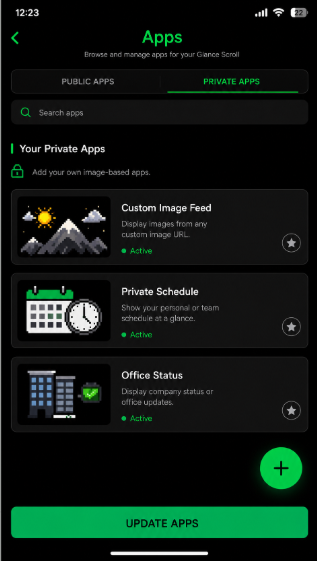
It all happens in the GLANCE Setup App: open Apps, switch to the Private Apps tab, and tap + to add your own.
Use any language or tool you like. There is no SDK, no Starlark, and no Python
required. Glance only cares that your URL returns a PNG image - generate it however you
want, in whatever language or framework you already use, and the URL does not even need a
.png/.jpg ending (a dynamic endpoint works too). Your Glance fetches it, stores it in
its own memory, and shows it.
- Use a PNG - that is the only format a Glance Scroll decodes, and it is lossless so it stays crisp at panel size (JPEG is not supported).
- Size it to the panel: up to 192 pixels wide (it can be narrower) and 32 pixels tall. That is a single frame - if you need multiple pages, more images, or more data than fits, split it into separate images (each is its own private app).
Need somewhere to host it? You do not need much, and most options are free:
- Cloudflare Pages is the easiest for a static
image (a logo, a fixed sign). Put your
.pngin and you get a public URL in a few minutes on the free plan. This Cloudflare Pages walkthrough is a good start, and an AI assistant can scaffold the whole thing for you. - Cloudflare Workers suits a dynamic image you generate on the fly (a live score, changing data). A Worker is a small piece of code that runs on Cloudflare's edge and returns your image on each request - the free plan is generous and it deploys in a few minutes.
- Render spins up a small web service in almost any language; search YouTube for deploy a web app on Render or read Render's docs.
- A Raspberry Pi on your own network works too - run a tiny web server at home that returns your image.
Either way, the only requirement is a public URL that returns a PNG image - it does not need a file extension. Not sure where to start? An AI assistant can generate the whole thing for you.
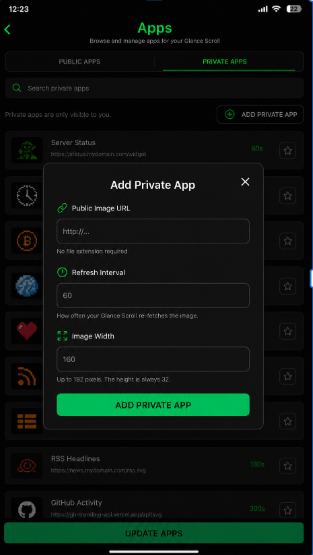
You provide:
- a public image URL (
http://...- no file extension required), - a refresh interval - how often your Glance re-fetches the image,
- the image width (up to 192). The height is always 32 to match the Glance Scroll.
Your Glance fetches that image directly over your own network and caches it on the device itself. Glance's servers store your URL so the Glance Scroll knows where to look, but the picture is never uploaded to, stored on, or proxied through Glance - it lives only in your Glance's own memory.
Glance can hold up to 10 private apps or images at a time.
Once your Glance fetches an image it keeps it in the device's own memory and only goes back to your server on the refresh interval (TTL) you set. A 5-minute refresh means about one request every 5 minutes, not a constant stream - between refreshes it redraws the cached copy with no network traffic at all.
Your Glance fetches its images over plain http rather than https. This is a
deliberate design choice: the device only downloads public, non-sensitive images and never
transmits passwords, personal details, or any data of its own. Since nothing private
travels over the connection, skipping encryption frees up memory and keeps the device fast
and responsive on frequent updates. The one rule that follows: only use images you would
consider public.