Drawing API (c.*)
Every page function receives a canvas c. You never touch pixels directly. You
describe a picture by calling c.* methods, and GDN's trusted renderer turns
that description into a PNG (and then into the panel's native format).
def main(c, ctx):
    c.fill("black")
    c.rect(0, 0, c.width - 1, 7, fill="green")
    c.text("GLANCE", 4, 1, font="5x7", color="black")
    c.text(ctx.inputs.get("msg", "HELLO").upper(), 4, 12, font="5x7", color="white")
The canvas & coordinates

- Origin
(0, 0)is the top-left pixel.xgrows right,ygrows down. - For
c.text(...),c.image(...)andc.bitmap(...), (x, y) is the top-left corner of what you draw; the text/image extends right and down from that point. Soc.image("pawn.png", 4, 3)puts the image's top-left corner 4 pixels from the left edge and 3 from the top. - The one exception is circles:
c.circle(cx, cy, r...)centers on(cx, cy). - The panel is always 32 pixels tall. A single panel is 64 pixels wide and panels daisy-chain for wider displays, up to 384 pixels wide; for best performance keep images to 192 pixels wide or smaller and split content across pages. Width is whatever your manifest sets.
c.widthandc.heightgive the canvas size; use them instead of hard-coding.- Anything drawn past the edges is safely clipped, no errors, it just doesn't show.
Colors
Anywhere a color is accepted you can pass a name ("green", "white",
"red", "amber", …) or a hex string ("#00FF00", "#FC0"). Glance's brand
green is #00FF00. The global color struct has all the named constants plus
color.dim(c, pct) for darkened variants, see
Helper functions.
Every named color, as it looks on the panel — click a chip to copy its name
(gray/darkgray/midgray also answer to the grey spellings):
Text is UPPERCASE
The bitmap fonts contain capital letters, digits, and punctuation, but no lowercase
glyphs. Lowercase characters are silently skipped, so c.text("hello", …) draws
nothing. Write strings in caps, and .upper() anything that comes from an input.
Methods
| Call | What it does |
|---|---|
c.fill(color) | Fill the whole canvas with one color (usually your first call). |
c.pixel(x, y, color) | Set a single pixel. |
c.rect(x0, y0, x1, y1, fill=None, outline=None) | Inclusive rectangle from (x0,y0) to (x1,y1). Pass fill, outline, or both. |
c.line(x0, y0, x1, y1, color) | Straight line, inclusive endpoints. |
c.text(s, x, y, font="5x7", color="white", align="left") | Draw text. align is left, center, or right. |
c.text_stroke(s, x, y, font="5x7", color="white", stroke="black", thickness=1, align="left") | Text with an outline around every glyph, for legibility over filled or busy backgrounds. See Outlined text. |
c.text_width(s, font="5x7") | Measure a string's pixel width (for layout/centering). |
c.bitmap(matrix, x, y, color) | Draw pixel art: a 2D list of 0/1; each 1 lights a pixel in color. |
c.image(name, x, y, w=None, h=None) | Paste a bundled PNG (declared in assets:). w/h resize with crisp nearest-neighbor. |
These are the primitives. On top of them, c also has higher-level helpers: circles, triangles, rounded rects, centered/wrapped/auto-sized text, progress bars,
sparklines, badges, and trend arrows, documented on the
Helper functions page.
All drawing methods return c, so you can chain them:
c.fill("black").text("HI", 2, 2, color="green").rect(0, 10, 30, 10, fill="red")
Measuring & centering
w = c.text_width("SCORE", font="7x12")
c.text("SCORE", (c.width - w) // 2, 4, font="7x12", color="amber")
# …or just:
c.text("SCORE", c.width // 2, 4, font="7x12", color="amber", align="center")
Outlined text
c.text_stroke is c.text with a border: it draws the string once in stroke
at every offset within thickness pixels, then once more in color on top. It
mirrors the panel's own drawTextWithStroke, so what you see in Studio is what the
LEDs show.
# contrast on a filled background: the default black stroke
c.gradient_rect(0, 0, c.width - 1, c.height - 1, "#1E3350", "#0A1220", horizontal=False)
c.text_stroke("SUNRISE 6:42", 6, 4, font="6x8", color="white")

# a colored outline as a design choice
c.text_stroke("BLUE OUTLINE", 4, 3, font="6x8", color="white", stroke="#2F6FDC")
c.text_stroke("THICK", 4, 17, font="6x8", color="#FFE8A8", stroke="#7521F9", thickness=2)

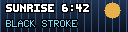
c.text on a filled background. Right: c.text_stroke, default black stroke.When to use it, and when black is the right stroke, is on the
Type, color & stroke page. The
10x15_outline and 10x16_outline fonts carry a border in
the glyphs themselves — a hero face that needs no stroke call.
Pixel-art bitmaps
HEART = [
  [0,1,0,1,0],
  [1,1,1,1,1],
  [0,1,1,1,0],
  [0,0,1,0,0],
]
c.bitmap(HEART, 12, 13, color="red")
See also: Fonts · Working with images · Design guidelines.